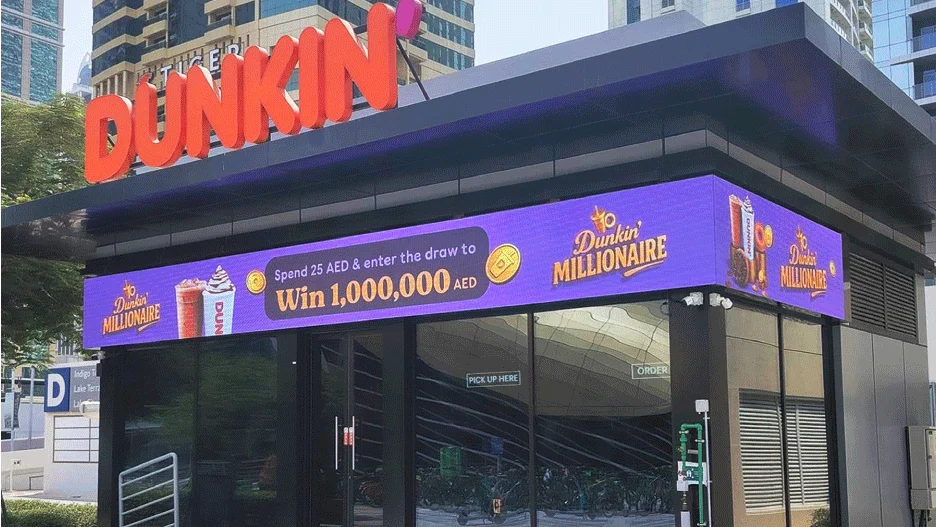
A poorly specified LED screen doesn’t just underperform — it can visibly damage a shopfront’s brand impression, generate ongoing maintenance cost, and in some cases fail structurally. The most common failures trace back to a handful of specification and installation mistakes that are entirely avoidable at the planning stage.
Mistake 1: wrong pixel pitch for the actual viewing distance
Choosing pixel pitch based on budget or screen size alone, rather than how far away people will actually stand, is the single most common shopfront LED mistake. A pitch that’s too coarse for a close viewing distance (such as a P6 screen mounted directly behind glass where pedestrians walk within a metre or two) looks pixelated and unfinished rather than sharp. Conversely, an unnecessarily fine pitch for a screen viewed from across a wide street wastes budget without adding visible benefit.
Mistake 2: poor ventilation and heat buildup
Shopfront LED screens are frequently installed in tight recesses — behind glass, within a bulkhead, or built into a shopfront frame — with little thought given to how heat generated by the panel will escape. Trapped heat accelerates driver and LED failure and, in sealed glass-fronted installations, can cause visible condensation or fogging between the screen and the glass. Ventilation gaps, spacing from the glass surface, and in some cases active cooling need to be designed in from the start, not retrofitted after the first summer.
Mistake 3: inadequate structural mounting
LED cabinets are heavier than they look, particularly at larger sizes, and shopfront mounting locations (glass, lightweight bulkheads, suspended ceilings) aren’t always designed to carry that load. Mounting a screen without confirming the substrate’s load capacity and using a bracket system rated for the actual weight and wind/vibration exposure of the location risks both premature bracket failure and safety hazard.
Mistake 4: content management neglected after installation
A well-specified screen with no realistic content plan quickly becomes a liability rather than an asset — either it runs the same static content indefinitely (undermining the reason for choosing a dynamic screen at all), or store staff without proper CMS training upload low-resolution or incorrectly formatted content that looks worse than a printed sign would have.
Quick reference: mistake, consequence, fix
| Mistake | Typical consequence | Fix |
|---|---|---|
| Wrong pixel pitch for viewing distance | Pixelated or wastefully over-specified image | Match pitch to real, measured viewing distance |
| No ventilation planning | Overheating, driver failure, glass fogging | Design airflow and clearance into the mounting detail |
| Undersized structural mounting | Bracket failure, safety risk, warranty issues | Confirm substrate load capacity and use a rated mounting system |
| No content management plan | Stale or poor-quality content undermines the investment | Specify CMS and assign content ownership before go-live |
| Ignoring daylight brightness at the specific facade orientation | Washed-out, unreadable content in direct sun | Specify brightness against the screen’s actual sun exposure, not a generic figure |
Related specification guidance
For the underlying pixel pitch, brightness, and CMS decisions covered in more detail, see our guides on specifying an indoor retail LED screen and outdoor LED screens in UAE heat and dust.
Frequently Asked Questions
Can an existing shopfront LED screen be fixed if it’s overheating?
Sometimes — adding ventilation gaps or active cooling retrospectively can help, but if the cabinet or glass recess was designed with no clearance at all, a full remount is often more reliable than a partial fix.
How do I know if my shopfront can structurally support an LED screen?
A structural assessment of the mounting substrate (glass, bulkhead, wall) against the screen’s actual installed weight, including brackets, should be done before ordering the panel, not after.
What’s the most common reason shopfront screens look unprofessional?
Poor content quality and mismatched pixel pitch for viewing distance are the two most common causes — both are avoidable with correct upfront specification and a maintained content plan.
Do I need a dedicated content manager for a shopfront LED screen?
Not necessarily a dedicated role, but someone on the team should own content scheduling and quality control — screens left unmanaged tend to degrade in presentation over time.
Avoid these mistakes on your shopfront screen
Share your shopfront dimensions and glass or mounting constraints and we’ll flag any specification risks before you commit. Contact us to review your shopfront LED screen plan.
Recommended Posts
LED Signage Retrofit: Repair or Replace Your Lighting
Should you repair, retrofit or replace an illuminated sign? An unlit or uneven sign does not always need complete replacement. It may need a local rep...

Signage Vendor Checklist for Architects and Consultants
A signage vendor checklist for architects and consultants Selecting a signage vendor requires more than comparing a finished photograph and a lump-sum...